• Поиск данных в окне Tracer

    Перенесена Вопросы, обсуждения и предложения tracer ce lua
    1
    0 Голоса
    1 Сообщения
    79 Просмотры
    MasterGHM
    \-- ищет адрес по адресу referencedAddress == 0x0165F8BC \-- ссылка на байты. Почему-то не работает. Ниже будет другой путь referencedBytes == dwordToByteTable(98) \-- сравнение по инструкции. В конце инструкции нужно ставить пробел instruction == "ret " \-- так будет искать все вхождения "mov" instruction:match("mov") Ну и более интересная версия перебора и одновременного выделения записей. Здесь нужно открыть окно "Трейсера" и рядом в Lua окне писать свои условия в функции "Compare()", "PrintData()", Selected() -- Поиск окна Трейслога function GetTTreeViewTracelogs() local max = getFormCount() for i=0, max-1 do if(getForm(i).ClassName == 'TfrmTracer') then return getForm(i) end end return nil end function FindTraceLogData() -- Нашли окно Трейслога tracerForm = GetTTreeViewTracelogs() -- Перебираем все записи for index=0, tracerForm.Count do -- Если запись пуста, то пропускаем if tracerForm.Entry[index] ~= nil then local entry = tracerForm.Entry[index] if Compare(entry) then Selected(entry, index) PrintData(entry,index ) end end end end \-- Можно свое условие addressEAX = 0x001FB780 function Compare(entry) return addressEAX == entry.context.EAX end function PrintData(entry) --print(tracerForm.Entry[index].instruction) print(disassemble(entry.context.RIP)) end function Selected(entry, index) tracerForm.lvTracer.Items[index].Selected = true end FindTraceLogData() Из документации по окну Tracer TfrmTracer class (Inheritance: Form->ScrollingWinControl->CustomControl->WinControl->Control->Component->Object) properties Count: integer - number of entries in the list selectionCount: integer - The number of selected entries Entry[index]: table - Information about each entry. Read only. (Index starts at 0) table is formatted as: { address: integer - address of the instruction instruction: string - disassembled instruction instructionSize: integer - bytesize of the instruction referencedAddress: integer - address the code references referencedData: bytearray - The bytes of the referenced data at the time of tracing context: contexttable - the state of the cpu when this instruction got executed (contains registers(EAX/RAX, ...), floating points(FP) and XMM values hasStackSnapshot: boolean - set to true if there is a stack entry selected: boolean - Set to true if the entry is selected } StackEntry[index]: bytearray - The stacksnapshot of that entry. Nil if not available methods \--------------------------------------------------- Treeview Class : (Inheritance: CustomControl->WinControl->Control->Component->Object) createTreeView(owner) properties Items: TreeNodes - The Treenodes object of the treeview (ReadOnly) Selected: TreeNode - The currently selected treenode methods beginUpdate() endUpdate() getItems() getSelected() setSelected() fullCollapse() : Collapses all the nodes, including the children's nodes fullExpand() : Expands all the nodes and all their children saveToFile(filename): Saves the contents of the treeview to disk \--------------- TreeNodes class : (Inheritance: TObject) properties Count : Integer - The total number of Treenodes this object has Item[]: TreeNode - Array to access each node [] = Item[] methods clear() getCount() getItem(integer) : Return the TreeNode object at the given index (based on the TreeView's Treenodes) add(text:string): Returns a new root Treenode object insert(treenode, string): Returns a new treenode object that has been inserted before the given treenode insertBehind(treenode, string): Returns a new treenode object that has been inserted after the given treenode \--------------- TreeNode class : (Inheritance: TObject) properties Text: string - The text of the treenode Parent: Treenode - The treenode this object is a child of. (can be nil) (ReadOnly) Level: Integer - The level this node is at HasChildren: boolean - Set to true if it has children, or you wish it to have an expand sign Expanded: boolean - Set to true if it has been expanded Count : Integer - The number of children this node has Items[]: Treenode - Array to access the child nodes of this node [] = Items[] Index: Integer - The index based on the parent AbsoluteIndex: Integer - The index based on the TreeView's Treenodes object (Items) Selected: Boolean - Set to true if currently selected MultiSelected: Boolean - Set to true if selected as well, but not the main selected object Data: Pointer - Space to store 4 or 8 bytes depending on which version of CE is used methods delete() deleteChildren() makeVisible() expand(recursive:boolean=TRUE OPTIONAL) : Expands the given node collapse(recursive:boolean=TRUE OPTIONAL) : collapses the given node getNextSibling(): Returns the treenode object that's behind this treenode on the same level add(text:string): Returns a Treenode object that is a child of the treenode used to create it ------------------------------------------ wordToByteTable(number): {} - Converts a word to a bytetable dwordToByteTable(number): {} - Converts a dword to a bytetable qwordToByteTable(number): {} - Converts a qword to a bytetable floatToByteTable(number): {} - Converts a float to a bytetable doubleToByteTable(number): {} - Converts a double to a bytetable extendedToByteTable(number): {} - Converts an extended to a bytetable stringToByteTable(string): {} - Converts a string to a bytetable wideStringToByteTable(string): {} - Converts a string to a widestring and converts that to a bytetable byteTableToWord(table, OPTIONAL signed:boolean): number - Converts a bytetable to a word byteTableToDword(table, OPTIONAL signed:boolean): number - Converts a bytetable to a dword byteTableToQword(table): number - Converts a bytetable to a qword byteTableToFloat(table): number - Converts a bytetable to a float byteTableToDouble(table): number - Converts a bytetable to a double byteTableToExtended(table): number - Converts a bytetable to an extended and converts that to a double byteTableToString(table): string - Converts a bytetable to a string byteTableToWideString(table): string - Converts a bytetable to a widestring and converts that to a string bOr(int1, int2) : Binary Or bXor(int1, int2) : Binary Xor bAnd(int1, int2) : Binary And bShl(int, int2) : Binary shift left bShr(int, int2) : Binary shift right bNot(int) : Binary not Для вывода referencedBytes из трейслога можно использовать byteTableToDword(referencedBytes) (смотрим документации выше) получая из TfrmTracer.Entry[index].referencedBytes или в строке поиска у Трейслога вбить byteTableToDword(referencedBytes) > 0 and print(string.format("0x%08X - 0x%08X", RIP, byteTableToDword(referencedBytes))) == 1
  • Создать структуру программно

    Перенесена Статьи и видео ce structure ce lua
    2
    2
    0 Голоса
    2 Сообщения
    116 Просмотры
    MasterGHM
    Решил попробовать написать CE Lua скрипт, который прочесывает структуру и в Dissect data/structures окне создавал бы структуру только со смещениями, с которыми код работает, т.е. читает или пишет. Например, мой персонаж прогуливается по городу, а каждые 200 мс ставится брейкпоинт на смещение +1 до гипотетической N границы структуры (например до 4096). Я не успел сделать определение типа, но смещения внутри структуры получить я успел. Итак, находим начало структуры любой. Запускаем Lua скрипт и просто что-то делаем в игре. Потом вылазит текст с дизассемблированными инструкциями и смещениями. Уже по этим логам можно определить вручную к каким смещением было обращение (адреса по ним мы и будем менять или сравнивать структуры между собой позже) по виду инструкции и соседнему смещению уже примерно можно определить тип данных и их размер Осталось сделать определение типа, а это не так уж долго сделать и осталось взять код из предыдущих записей в блоге формирования структуры в окне dessect data. Так мы получим структуру только с активными смещениями, (а зачем нам пассивные?) и определим в них тип, я надеюсь определим правильно Пример кода, который я использовал addressStructure1 = 0x412E0200 --> адрес начала структуры в любой игре sizeStructure = 100 --> гипототический размер структуры 100 для быстрых поисков, по умолчанию 4096 indexStructure = 0 --> индекс внутри структуры, который будет перемещаться вместе с breakPointAddress breakPointAddress = 0 --> адрес, на который сейчас постален брейкпоинт waitTimeTillBreak = 300 --> частота активности смещеиня resultText = '' --> конкатенация частей текста в этой переменной \-- Функция пытается поставить брейкпоинт на следующий байт в структуре function TryNextSetBreakPointToAddress() debug_removeBreakpoint(breakPointAddress) indexStructure = indexStructure + 1 if indexStructure > sizeStructure then debugTimer.Interval = 1000 debugTimer.Enabled = false debugTimer.destroy() debug_continueFromBreakpoint(co_run) print(resultText) --> вывод результата с завершением отладки return end breakPointAddress = addressStructure1 + indexStructure debug_setBreakpoint(breakPointAddress, 1, bptAccess, bpmDebugRegister) debug_continueFromBreakpoint(co_run) end \-- Любимая функция снятия отладочных данных function debugger_onBreakpoint() -- проверить обращение к структуре prevAddress = getPreviousOpcode(RIP) resultText = resultText..string.format('Offset: + %X : %s', indexStructure, disassemble(prevAddress)) .. '\r\n' TryNextSetBreakPointToAddress() return 1 end \-- Простой таймер debugTimer = createTimer(nil, false) debugTimer.OnTimer = function(timer) TryNextSetBreakPointToAddress() end debugTimer.Interval = waitTimeTillBreak debugTimer.Enabled = true breakPointAddress = addressStructure1 + indexStructure debug_setBreakpoint(breakPointAddress, 1, bptAccess, bpmDebugRegister)
  • Как контролировать включение и выключение скриптов в таблице

    Перенесена Статьи и видео ce lua условие управление
    1
    0 Голоса
    1 Сообщения
    88 Просмотры
    MasterGHM
    Как контролировать включение и выключение скриптов в таблице AA или "Autoassembler code" код похожий на язык программирования ассемблера. Кратко, он позволяет менять игровой код. Подробнее Cheat Engine:Auto Assembler (http://wiki.cheatengine.org/index.php?title=Cheat_Engine:Auto_Assembler) Обычный АА-скрипт состоит из двух директив и добавляется в таблицу CE как запись // Код срабатывающий как при активации, так и при деактивации [ENABLE] // Код активации [DISABLE] // Код деактивации Чтобы код активировался, нужно включить галку напротив записи в таблице и наоборот выключить. Есть такие директивы как {$lua} и {$asm}. Под {$lua} пишут Lua скрипт, под {$asm} пишут АА-скрипт. Мы можем проверить Lua скриптом любое условие и разрешить включать галку или выключать галку. Например, через "syntaxcheck" — проверку синтаксиса или другое условие . Если проверка не прошла, то не получится галку включить и не получится выключить, если что-то пойдет не так. В Lua строка из двух минусов "--", обозначает комментарий. {$lua} \-- Расскоментируйте или закоментируйте пару строк ниже \-- if syntaxcheck then return end \-- error[666] = 666 \------------------------------ ENABLE ------------------------------ [ENABLE] \-- Расскоментируйте или закоментируйте пару строк ниже \-- if syntaxcheck then return end \-- error[666] = 666 \------------------------------ DISABLE ------------------------------ [DISABLE] \-- Расскоментируйте или закоментируйте пару строк ниже \-- if syntaxcheck then return end \-- error[666] = 666 Попробовав разные варианты вы увидите, что нельзя включать или выключать галку в разных ситуациях. Например в этой получится включить галку, а выключить нет из-за ошибки. {$lua} \-- if syntaxcheck then return end \-- некоторый lua код правильный или не правильный \-- error[666] = 666 \------------------------------ ENABLE ------------------------------ [ENABLE] \--if syntaxcheck then return end \-- некоторый lua код \-- некоторый lua код правильный или не правильный \-- error[666] = 666 \------------------------------ DISABLE ------------------------------ [DISABLE] if syntaxcheck then return end \-- некоторый lua код \-- некоторый lua код правильный или не правильный error[666] = 666 Следующий вариант проверяет открыт ли процесс. Если нет, то покажет сообщение. Как узнать, что процесс был закрыт после открытия process - зарезервированное переменная, показывает что процесс открыт (http://wiki.cheatengine.org/index.php?title=Lua:process) В комментариях можно увидеть при каких условиях блокируются включение галки {$lua} -- code before either enable/disable section runs for both just like with AA code if syntaxcheck then return end [ENABLE] if process == nil then showMessage('Процесс не подключен. Галка не будет включена') return end if process ~= nil and readInteger(process) == nil then showMessage('Процесс был закрыт. Галка не будет включена') return end [DISABLE] -- Галку можно выключить, но код выключения выполнять если процесс подключен if process ~= nil and readInteger(process) ~= nil then print('Attached to ' .. process) else showMessage('The process closed') end
  • Часть1. Lua простые регулярные выражения

    Перенесена Статьи и видео ce lua regular
    1
    1
    0 Голоса
    1 Сообщения
    163 Просмотры
    MasterGHM
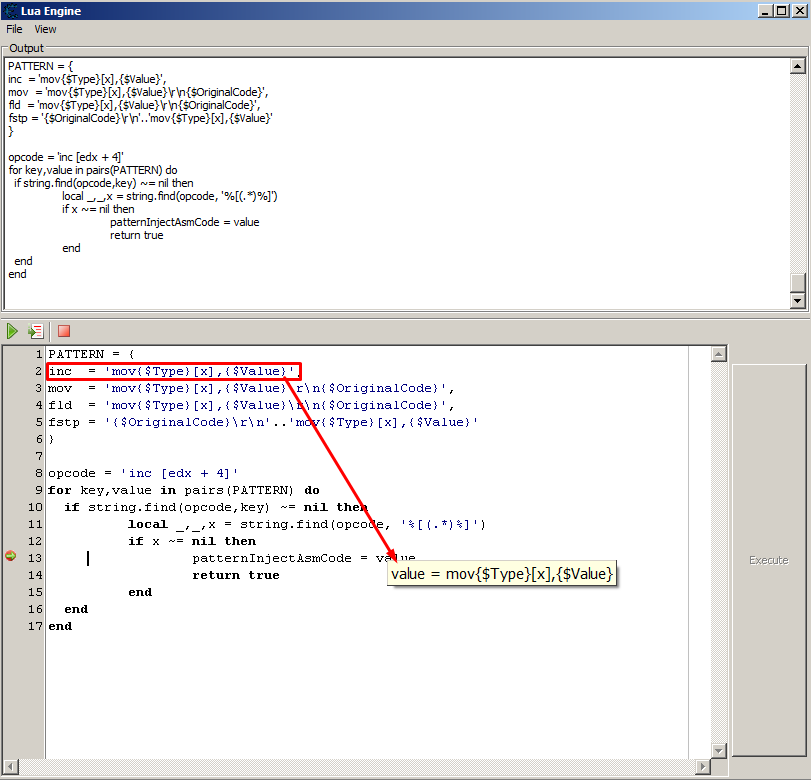
    Есть такой плагин "AA Maker" и там довольно интересные регулярные выражения на Lua. Разберем некоторые выражения Выражение ''%[(.*)%]' - захват всего, что в квадратных скобках Пример local s = 'mov eax, [ecx + 4]' print(string.match(s, '%[(.*)%]')) \--> ecx + 4 Символ "%" нужно всегда ставить перед специальными символами такими как ^$()%.[]*+-? Символ "%[" и "%]" означают квадратные скобки в строке Разбирая комбинацию (.*). Точка означает любой символ, а символ умножить означает повторение любого символа Круглые скобки означают "подшаблон" Подшаблоны В шаблон можно включить подшаблоны, выделив их круглыми скобками. Если найденная строка соответствует шаблону, то ее подстроки, соответствующие подшаблонам, будут доступны для будущего использования. Подшаблоны пронумерованы согласно их левым круглым скобкам. Например, в шаблоне "(a*(.)%w(%s*))", часть строки, соответствующая "a*(.)%w(%s*)" будет зафиксирована как первый подшаблон (и поэтому имеет номер 1); любые символы попавшие под соответствие "." будут зафиксированы как подшаблон номер 2, и часть строки, соответствующая "%s*" получит номер 3. Специальный вариант использования подшаблонов - получение текущей позиции в строке. Для этого используются пустые подшаблоны (). Например, если мы применим шаблон "()aa()" к строке "flaaap", то получим два результата: 3 и 5. Шаблон не может содержать вложенные ноли. Используйте %z вместо этого. Т.е. можем извлечь содержимое инструкции. Примеры "(.*)" - захват всей строки "/(.*)/" - захват всего, что находится между КРАЙНИМИ символами / "/(.-)/" - захват всего, что находится между ПЕРВЫМИ ДВУМЯ символами / Пример из ААMaker плагина local _,_,x = string.find(opcode, '%[(.*)%]') из функции ниже Функция string.find("СТРОКА", "ШАБЛОН") возвращает номер позиции начала начала и конца шаблона Пример print(string.find('some string', 'me')) \--> 3 4 Вся функция с комментариями из AAMaker \-- Таблица паттернов для нескольких инструкций inc, mov, fld, fstp (ключи таблицы) \-- Они нужны для создания автоматического АА кода, через замену строк другими строками \- {$Type} — очевидно для типа byte, word, dword \- [x] — очевидно обращение к адресу \- {$Value} — это значение \- \r\n — переход на следующую строку \-- Что будем делать с этой таблицой будет видно по коду или смотрите плагин PATTERN = { ['inc'] = 'mov{$Type}[x],{$Value}', ['mov'] = 'mov{$Type}[x],{$Value}\r\n{$OriginalCode}', ['fld'] = 'mov{$Type}[x],{$Value}\r\n{$OriginalCode}', ['fstp'] = '{$OriginalCode}\r\n'..'mov{$Type}[x],{$Value}' } \-- Не очень понятно зачем квадратные скобки у ключей. Можно написать не ['inc'], а 'inc' \-- Функция проверки паттерна function checkPattern() -- Получение имени адреса из адреса dv_address1 (выделенный адрес в дизассемблере) local address = getNameFromAddress(dv_address1) -- Получение инструкции по имени адреса local _,opcode = splitDisassembledString(disassemble(address)) -- ComboBox.Text свойство равно "Injection" или "AOBScanModule" local choose = getProperty(cmbCheatType,"Text") if choose == 'Injection' or choose == 'AOBScanModule' then -- Перебор по ключу и значению таблицы PATTERN for key,value in pairs(PATTERN) do -- Если в опкоде нашли ключ из таблицы паттернов -- Где key это inc, mov, fld, fstp (см. выше таблицу PATTERN) -- Где opcode это например инструкция 'inc [edx + 4]' if string.find(opcode,key) ~= nil then local _,_,x = string.find(opcode, '%[(.*)%]') if x ~= nil then -- В value будет значение 'mov{$Type}[x],{$Value}' patternInjectAsmCode = value -- Нашли паттерн и вернули его return true end end end end -- Паттерн не нашли в таблице, вернули false patternInjectAsmCode = '{$OriginalCode}' return false end \-- patternInjectAsmCode Чтобы посмотреть результат, сделал скрин отладки Lua кода Функции по работе со строками. Link Используемые источники: link, link, link, link aamaker.lua
  • Часть2. Lua простые регулярные выражения

    Перенесена Статьи и видео lua regular ce lua
    1
    0 Голоса
    1 Сообщения
    88 Просмотры
    MasterGHM
    Если нужно найти начало и конец подстроки. Пример Попробуем найти слово lab в троке gamehacklab.ru print(string.find('gamehacklab.ru', 'lab')) >9 11 Если не найдена подстрока, то вернет nil. С помощью string.match можем выводить не индексы, а строку print(string.match('gamehacklab.ru', 'lab')) >lab С помощью string.gmatch можем выводить последовательно строки Где 'a.' означает символ 'a' и еще один следующий любой local result = string.gmatch('gamehacklab.ru', 'a.') print(result()) print(result()) print(result()) вывод >am >ac >ab Здесь комбинация символов "%a+" означает искать слово пока оно не закончится s = "hello world from Lua" for w in string.gmatch(s, "%a+") do print(w) end Вывод > hello > world > from > Lua А здесь заполняем таблицу ключ — значение из строки, которую можно было бы взять из файла t = {} s = "X=0, Y=0, Z=0" for k, v in string.gmatch(s, "(%w+)=(%w+)") do t[k] = v end for i, v in pairs(t) do print(i..' = '..v) end Вывод >Z = 0 >X = 0 >Y = 0 Пока на этом все... Более сложные примеры в предыдущей части записи
  • Рубрика "Lua код сегодня" №6 (проверка по md5)

    Перенесена Статьи и видео md5 ce lua speak важно обучалка фишки
    1
    0 Голоса
    1 Сообщения
    238 Просмотры
    MasterGHM
    Получить md5 открытого процесса и записать его в MD5_CHEKING вручную \-- Функция для ручного вывода md5 ранее подключенного процесcа. Для установки MD5_CHEKING PrintMd5CurrentProcess() Пример проверки md5 function onOpenProcess(processid) reinitializeSymbolhandler() local md5Process = GetMd5Process(processid) PrintMd5Process(process, md5Process) local isSupportedVersion = CheckingMd5CurrentProcess(md5Process) local lineResult = isSupportedVersion and 'Is supported version.' or 'Is not supported version.' if not isSupportedVersion then speakEnglish(lineResult, false) messageDialog('Error', lineResult, mtError, mbClose) end end ce_md5.lua md5 - это алгоритм некоторой суммы байтов exe-шника. Позволит точно идентифицировать exe-шник, для которого будет сделана .CT таблица с указателями или сигнатурами. В случае несоответствия будет показан диалог сообщения и звуковое оповещение проговаривания текста ошибки. Будет необходимо проверять md5, чтобы смещения у структур точно не поменялись.
  • CE рисование через дополнительный поток

    Перенесена Статьи и видео ce thread ce lua ce draw ce видео
    1
    0 Голоса
    1 Сообщения
    68 Просмотры
    MasterGHM
    На видео показано рисование через поток и рисование без потока CE Native Thread Когда происходит рисование без потока, то окно нельзя подвинуть, не работает кнопка и даже не возможно работать с Cheat Engine function FilledWithPixels() while true do ::begin:: UDF1.repaint() for x=1,UDF1.Canvas.Width do for y=1,UDF1.Canvas.Height do local min = math.random(1, 0xFFFF) local max = math.random(0xFFFF, 0x00FFFFFF) UDF1.Canvas.SetPixel(x,y, math.random (min, max)) if(needReUpdate) then needReUpdate = false goto begin end end end t.suspend() end end t = createNativeThreadSuspended(FilledWithPixels) t.name = 'New thread 1' needReUpdate = true UDF1 = createForm() UDF1.Width = 400 UDF1.Height = 200 btn = createButton(UDF1) btn.OnClick = function (sender) needReUpdate = true t.resume() end
  • Cheat Engine и Lua. Старт

    Прикреплена Перенесена Статьи и видео ce lua
    1
    0 Голоса
    1 Сообщения
    283 Просмотры
    MasterGHM
    Где писать Lua код? Lua Engine окно, которое вызывается из главного окна CE. Lua Console окно, которое вызывается из окна отладки CE. Окно Autoassembler скрипта с вставки {$lua}, {$asm} Lua Engine окно и Autoassembler-ные скрипты могут сохраняться в файлах Cheat Engine *.CT. *.CETRAINER, *.EXE Lua Console для пошаговой отладки Lua кода и просмотров результатов ошибок и функции print() Моя первая программа Сначала узнаем версию для CE 6.7 и это будет первая программа Запускаем CE и жмем ctrl+alt+L и Lua Engine, вводим print(_VERSION) \-->> Lua 5.3 Вторая программа showMessage('Hello World!') Следующий шаг — собрать справочные материалы и практические руководства. Неважно какими они будут по сложности и объему. Всегда можно будет обратиться к ним позже, когда потребуется что-то найти. Справочные материалы Если CE использует версию Lua 5.3, то нужен официальный справочник по этой версии. Ищем Lua 5.3 (https://www.lua.org/manual/5.3/) Cheat Engine Lua Basics (http://wiki.cheatengine.org/index.php?title=Lua_Basics ) Category:Assembler(http://wiki.cheatengine.org/index.php?title=Category:Assembler) Lua Functions and Classes (http://wiki.cheatengine.org/index.php?title=Lua) Introduction to Lua using Cheat Engine: Beginner to Basic Script Writer! (http://dsasmblr.com/introduction-to-lua-using-cheat-engine-beginner-to-basic-script-writer/) Setup a Lua auto attach script (http://wiki.cheatengine.org/index.php?title=Tutorials:Lua:Setup_Auto_Attach) Lua Debugging (http://wiki.cheatengine.org/index.php?title=Lua_Debugging) Практические руководства Tables Tutorial (http://lua-users.org/wiki/TablesTutorial) Learn Lua in 15 Minutes (http://tylerneylon.com/a/learn-lua/) Lua за 60 минут (https://zserge.wordpress.com/2012/02/23/lua-за-60-минут/) Я обращаюсь к celua.txt и defines.lua. Находятся в директории Cheat Engine. В этих файлах краткое справочное руководство. Стоит также отметить, что Cheat Engine 6.7 написана на Lazarus. Написав, например программу по рисованию фигур, линий на форме на Lazarus или Delphi можно будет понять, как сделать также классами и функциями на CE Lua. А что нельзя сделать CE Lua, то решается внедрением и исполнения кода в саму Cheat Engine. Продолжение следует...
  • Большой брейкпоинт page exceptions

    Перенесена Статьи и видео breakpoint фишки ce lua
    1
    4
    0 Голоса
    1 Сообщения
    97 Просмотры
    MasterGHM
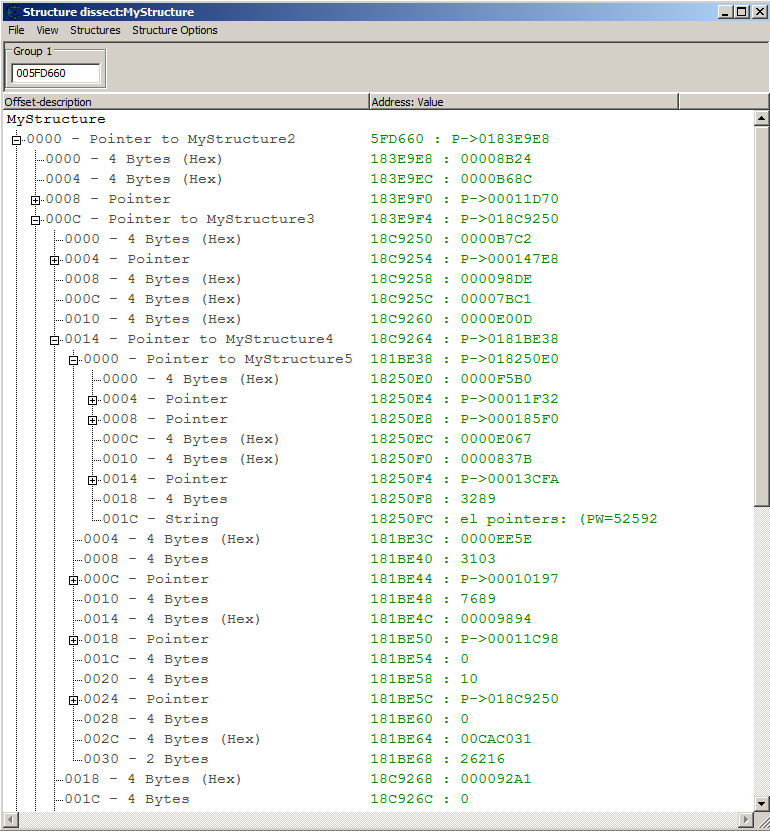
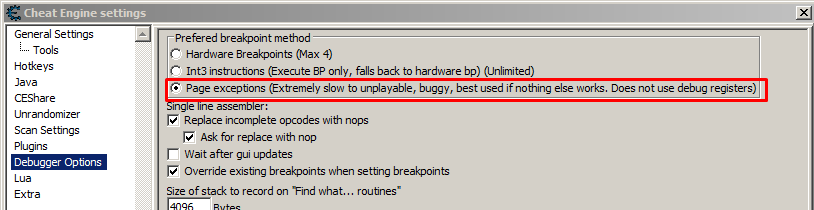
    Наткнувшись на тему вспомнил, что не все написал. В прошлом посте блога рассматривал бряк через DBVM. К сожалению, та версия dbvm из поста блога пропускала очень много инструкций и практически смысла нет её юзать. Например она определяла 16 инструкций, когда их было несколько тысяч, т.е. например 500 оффестов и на каждой по 10 инструкций. По DBVM надо, конечно, писать Дарк Байту, но желания нет. Так вот. Не только с DBVM можно ставить бряки на участок памяти. Есть еще тип брейкпоинтов page exceptions. О нем давно-давно известно и он как на ладони, но почему-то я пропустил его, когда искал оффсеты в структурах С ним можно работать с lua и без. Ловит огромное количество инструкций. Желательно мощное железо, т.к. игра скорее всего будет очень тормозить по 2-5 fps. Но на короткий запуск сойдет. 5 секунд и достаточно для снятия логов. На пару действий в игре тоже сойдет: выстрел или пермещение персонажа, прыжок или вообще ничего не делаем просто снимаем логи. способ поставить бряк из окна памяти. Подопытная программа "Tutorial-x86_64.exe" Здесь видно, что размер 720 байт Логи из окна инструкций CE 1000259AE - 48 8B 00 - mov rax,[rax] 1000259C3 - 48 8B 00 - mov rax,[rax] 10001D70C - F7 40 50 10000000 - test [rax+50],00000010 10001D734 - 48 8B 00 - mov rax,[rax] 1000AAB40 - 48 83 78 70 00 - cmp qword ptr [rax+70],00 10001D809 - F7 40 50 10000000 - test [rax+50],00000010 10000D452 - 48 8B 0A - mov rcx,[rdx] 10005AE70 - 83 40 68 01 - add dword ptr [rax+68],01 1000A4CF5 - F7 40 50 10000000 - test [rax+50],00000010 1000A4EB8 - 48 8B 00 - mov rax,[rax] 10000DA76 - 4C 8B 32 - mov r14,[rdx] 10005AE90 - 83 68 68 01 - sub dword ptr [rax+68],01 100139C13 - F7 40 50 10000000 - test [rax+50],00000010 100139C32 - 48 8B 48 60 - mov rcx,[rax+60] 100139C46 - 48 8B 40 60 - mov rax,[rax+60] 10009CEFB - 48 8B 00 - mov rax,[rax] 100098850 - 8B 80 80010000 - mov eax,[rax+00000180] 1000A4E81 - 81 88 00010000 00200000 - or [rax+00000100],00002000 1000A4E98 - 48 8B 00 - mov rax,[rax] 1000AD685 - F7 40 50 08000000 - test [rax+50],00000008 10009BFB8 - 8B 40 50 - mov eax,[rax+50] 10009816F - F7 40 50 08000000 - test [rax+50],00000008 100098236 - 48 8B 00 - mov rax,[rax] 10001BECE - 48 8B 00 - mov rax,[rax] 100098419 - F7 40 50 08000000 - test [rax+50],00000008 1000A2A28 - 48 8B 00 - mov rax,[rax] 1000A29F4 - 48 8B 12 - mov rdx,[rdx] 1000A4CC8 - 81 A0 00010000 FFDFFFFF - and [rax+00000100],FFFFDFFF 10001CC58 - F7 40 50 10000000 - test [rax+50],00000010 10000DB13 - 48 8B 00 - mov rax,[rax] 100095C65 - 48 8B 48 60 - mov rcx,[rax+60] 100095C75 - 48 8B 40 60 - mov rax,[rax+60] 10001CB04 - F7 40 50 10000000 - test [rax+50],00000010 10009BF35 - 8B 40 50 - mov eax,[rax+50] 10009932D - 48 8B 00 - mov rax,[rax] 10001F5C8 - F7 40 50 08000000 - test [rax+50],00000008 10001F638 - 8B 40 50 - mov eax,[rax+50] 100021803 - F7 40 50 08000000 - test [rax+50],00000008 100021923 - F7 40 50 08000000 - test [rax+50],00000008 10001ACB1 - 8B 41 50 - mov eax,[rcx+50] 10001B850 - 48 8B 48 60 - mov rcx,[rax+60] 10001B85C - 48 8B 40 60 - mov rax,[rax+60] 1000A2AC0 - 48 8B 00 - mov rax,[rax] 10013A2A3 - F7 40 50 10000000 - test [rax+50],00000010 10013A336 - 48 8B 00 - mov rax,[rax] 100098AC4 - 4C 8B 02 - mov r8,[rdx] 100098AD9 - 48 8B 00 - mov rax,[rax] 10013A35C - 48 8B 00 - mov rax,[rax] 10008A0C1 - 48 8B 00 - mov rax,[rax] 1000192A9 - 48 8B 12 - mov rdx,[rdx] 1000A3B99 - 48 8B 12 - mov rdx,[rdx] 100096636 - 8B 82 D0010000 - mov eax,[rdx+000001D0] 10008A0ED - 48 8B 00 - mov rax,[rax] 100097DF9 - 48 8B 00 - mov rax,[rax] 1000A4325 - 81 B8 80010000 FF7F0000 - cmp [rax+00000180],00007FFF 1000A6218 - F7 40 50 10000000 - test [rax+50],00000010 1000A6240 - 48 8B 00 - mov rax,[rax] 1000A6254 - 48 8B 00 - mov rax,[rax] 100097727 - 48 8B 48 60 - mov rcx,[rax+60] 100097733 - 48 8B 40 60 - mov rax,[rax+60] 10018E4D9 - F7 40 50 10000000 - test [rax+50],00000010 1000AA369 - F7 80 58010000 00400000 - test [rax+00000158],00004000 1000AA394 - 48 8B 00 - mov rax,[rax] 1000AA600 - 48 83 B8 B0020000 00 - cmp qword ptr [rax+000002B0],00 100097E3B - 48 8B 00 - mov rax,[rax] 1000A74A9 - 48 8B 00 - mov rax,[rax] Способ через Lua (подробнее в документации) debug_setBreakpoint(structure_address, sizeMemory, bptAccess, bpmException, onBreakpoint) P.S. Я написал про два способа установки брейкпоинта на множество адресов без DBVM. Вручную можно ставить такие брейкпоинты, но дальше уже кропотливый просмотр на предмет того чем это может помочь. Это может помочь определить типы данных и помочь прикинуть размер структуры, а также найти активные оффсеты. Можно на Lua автоматически определять активные offsets по базовому адресу структуры и эту структуру создать и заполнить в dessectData. Если будет время напишу скрипт.

  • Запустить активирющий скрипт CE 7.5

    Перенесена Статьи и видео ce aa active rec ce lua важно
    5
    1 Голоса
    5 Сообщения
    357 Просмотры
    MasterGHM
    Кнопка "^"
  • Lua ООП конспект

    Справочники ce lua oop
    1
    0 Голоса
    1 Сообщения
    66 Просмотры
    MasterGHM
    Пригодится для создания больших плагинов в Cheat Engine. Более ~500 строк Наследование ClassX = {} function ClassX:New(_argument1, _argument2) local obj = {} obj.argument1 = _argument1 obj.argument2 = _argument2 -- Через "self" function obj:GetValue1() return obj.argument1 end function obj:GetValue2() return obj.argument2 end setmetatable(obj, self) obj.__index = ClassX return obj end someObject = ClassX:New("A", "B") print(someObject.GetValue1()) print(someObject.GetValue2()) Woman = {} --наследуемся setmetatable(Woman ,{__index = ClassX}) --проверяем masha = Woman:New("Марья","Ивановна") print(masha:GetValue1()) --->результат: Марья Инкапсуляция Person = {} function Person:new(name) --приватное свойство local private = {} private.age = 18 local obj = {} --публичное свойство obj.name = name or "Вася" -- "Вася" - это значение по умолчанию function obj:getAge() return private.age end setmetatable(obj,self) self.__index = self return obj end vasya = Person:new() print(vasya.name) --> результат: Вася print(vasya.age) --> результат: nil print(vasya:getAge()) --> результат: 18 Полиморфизм Person = {} function Person:New(name) local private = {} private.age = 18 local obj = {} obj.name = name or "Вася" -- Защищенный от переорпеделения function obj:GetName() return "Person protected "..self.name end -- Переопределяемый function Person:GetName2() return "Person "..self.name end setmetatable(obj, self) self.__index = self return obj end --создадим класс, унаследованный от Person Woman = {} setmetatable(Woman,{__index = Person}) function Woman:GetName() return "Woman protected "..self.name end function Woman:GetName2() return "Woman "..self.name end --проверим masha = Woman:New() print(masha:GetName()) --> Person protected Вася print(masha:GetName2()) --> Woman Вася ref
  • Функция autoAssemble

    Перенесена Статьи и видео ce aa ce lua autoassemble
    2
    1 Голоса
    2 Сообщения
    2k Просмотры
    PitronicP
    Пользователь @MasterGH написал в Функция autoAssemble: // Скрипт похожий на таблицу АА Маленькое замечание. Два слеша используются для коментариев в асм. На луа используются пунктир не менее двух чёрточек. Если пользователь не разбирается, он не поймёт почему луа выдаёт ошибку. Тему поправил.
  • CE Lua чистка памяти от утечек

    CE Plugins ce lua ce plugin memory leak
    2
    0 Голоса
    2 Сообщения
    139 Просмотры
    MasterGHM
    Оптимизация CE Lua кода по сборке мусора Есть инструкции, которые добавляют мусора больше чем другие. Показываем объем памяти мусора print(string.format('Lua memory usage %.1f MiB',collectgarbage('count')/1024)) Ниже код того как попробовать узнать сколько мусора добавил код при парсинге ассемблерной строки двумя способами local s = " 0045464A - FF 05 A4B54500 - inc [0045B5A4] { [000003EA] }" function GetDebugString(address) return splitDisassembledString(s) end \-- address, bytes, opcode function GetDebugString2(address) local clearString = string.gsub(s, '%s','') return string.match(clearString, '^(.-)%-(.-)%-(.-)$') end function NoOptimizeCode() GetDebugString2() end function OptimizeCode() GetDebugString() end local countRepeat = 500000 -- add more cycle local x1 = 0 local x2 = 0 x1 = getTickCount() print(string.format('Lua memory usage %.1f MiB',collectgarbage('count')/1024)) for i = 1, countRepeat do NoOptimizeCode() end print(string.format('Lua memory usage %.1f MiB',collectgarbage('count')/1024)) x2 = getTickCount() for i = 1, countRepeat do OptimizeCode() end print(string.format('Lua memory usage %.1f MiB',collectgarbage('count')/1024)) print(string.format("%.2f", (x2 - x1)/(getTickCount() - x2)) ) Пример результатов могут отличаться. Фиг его знает почему. Возможно работает сборщик мусора в разные моменты времени Lua memory usage 1.8 MiB Lua memory usage 1.8 MiB Lua memory usage 1.8 MiB 1.49 Lua memory usage 1.8 MiB Lua memory usage 2.3 MiB Lua memory usage 2.3 MiB 1.47 Lua memory usage 2.3 MiB Lua memory usage 2.8 MiB Lua memory usage 2.8 MiB 1.49
  • Обработка исключения в Cheat Engine Lua

    Перенесена Статьи и видео ce lua exception
    1
    0 Голоса
    1 Сообщения
    100 Просмотры
    MasterGHM
    pcall() функция может вызывать функцию, которая может вызывать исключение. Возвращает статус в виде булевой о том, есть ли исключение или нет и возвращает текст исключения. function ThrowException() -- раскоментировать чтобы зывать ошибку по условию некоторому -- error("string expected", 2) -- Пример вывода стека ошибки print('AAA ->> '..debug.traceback()) -- Исключение делаем temp[5] = 1 -- До этой строчки не дойдет, т.к. исключение выше будет из-за temp[5] = 1 print('BBB ->> '..debug.traceback()) end local status, err = pcall(ThrowException) -- Показать какие типы имеют статус и ошибка (это булевый и строка) print(type(status)) print(type(err)) if status then print('No Exception') else print('Exception: ' .. err) end Как этим пользоваться? Если вдруг знаем, что может произойти ошибка, то можно её обработать и выполнить правильное действие не останавливая работу Lua скрипта. Подробнее документация Или например если не выполняется условие, то можем сами создать ошибку с помощью функции error, что остановит скрипт.
  • Считаем размер инъекции в байтах

    Перенесена Статьи и видео ce lua фишки ce aa
    1
    2
    0 Голоса
    1 Сообщения
    68 Просмотры
    MasterGHM
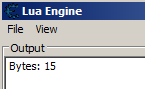
    Можно подхватить разные моменты активации и деактивации записи в таблице CE и рассчитать размер кода между метками По шаблону вставляем АА код для туториала Cheat Engine Регистрируем метки-маркеры в АА коде Этими метками в Lua считаем и выводим ""endCode - startCode" размер байтов Пример, который подсчитал 15 байтов Пример скрипта {$lua} memrec.OnActivate = function (memoryrecord, before, currentstate) if currentstate and not before then print("Bytes: " .. getAddress("endCode - startCode")) end return before end {$ASM} [ENABLE] //code from here to '[DISABLE]' will be used to enable the cheat aobscanmodule(INJECT,Tutorial-i386.exe,81 BB 80 04 00 00 E8 03 00 00) // should be unique alloc(newmem,$1000) label(code) label(endCode) label(startCode) registerSymbol(startCode) registerSymbol(endCode) newmem: code: startCode: cmp [ebx+00000480],000003E8 jmp return endCode: INJECT: jmp newmem nop nop nop nop nop return: registersymbol(INJECT) [DISABLE] //code from here till the end of the code will be used to disable the cheat INJECT: db 81 BB 80 04 00 00 E8 03 00 00 unregistersymbol(startCode) unregistersymbol(endCode) unregistersymbol(INJECT) dealloc(newmem) { // ORIGINAL CODE - INJECTION POINT: "Tutorial-i386.exe"+23FE3 "Tutorial-i386.exe"+23FD1: C9 - leave "Tutorial-i386.exe"+23FD2: C3 - ret "Tutorial-i386.exe"+23FD3: 00 00 - add [eax],al "Tutorial-i386.exe"+23FD5: 00 00 - add [eax],al "Tutorial-i386.exe"+23FD7: 00 00 - add [eax],al "Tutorial-i386.exe"+23FD9: 00 00 - add [eax],al "Tutorial-i386.exe"+23FDB: 00 00 - add [eax],al "Tutorial-i386.exe"+23FDD: 00 00 - add [eax],al "Tutorial-i386.exe"+23FDF: 00 53 89 - add [ebx-77],dl "Tutorial-i386.exe"+23FE2: C3 - ret // ---------- INJECTING HERE ---------- "Tutorial-i386.exe"+23FE3: 81 BB 80 04 00 00 E8 03 00 00 - cmp [ebx+00000480],000003E8 // ---------- DONE INJECTING ---------- "Tutorial-i386.exe"+23FED: 75 2C - jne Tutorial-i386.exe+2401B "Tutorial-i386.exe"+23FEF: 8B 83 68 04 00 00 - mov eax,[ebx+00000468] "Tutorial-i386.exe"+23FF5: B2 01 - mov dl,01 "Tutorial-i386.exe"+23FF7: 8B 8B 68 04 00 00 - mov ecx,[ebx+00000468] "Tutorial-i386.exe"+23FFD: 8B 09 - mov ecx,[ecx] "Tutorial-i386.exe"+23FFF: FF 91 20 02 00 00 - call dword ptr [ecx+00000220] Документация кому интересно MemoryRecord Class: The memoryrecord objects are the entries you see in the addresslist properties ID: Integer - Unique ID Index: Integer - The index ID for this record. 0 is top. (ReadOnly) Description: string- The description of the memory record Address: string - Get/set the interpretable address string. Useful for simple address settings. AddressString: string - Get the address string shown in CE (ReadOnly) OffsetCount: integer - The number of offsets. Set to 0 for a normal address Offset[] : integer - Array to access each offset OffsetText[] : string - Array to access each offset using the interpretable text style CurrentAddress: integer - The address the memoryrecord points to VarType: ValueType (string) - The variable type of this record. See vtByte to vtCustom Type: ValueType (number) - The variable type of this record. See vtByte to vtCustom If the type is vtString then the following properties are available: String.Size: Number of characters in the string String.Unicode: boolean String.Codepage: boolean If the type is vtBinary then the following properties are available Binary.Startbit: First bit to start reading from Binary.Size : Number of bits If the type is vtByteArray then the following properties are available Aob.Size : Number of bytes CustomTypeName: String - If the type is vtCustom this will contain the name of the CustomType Script: String - If the type is vtAutoAssembler this will contain the auto assembler script Value: string - The value in stringform. Selected: boolean - Set to true if selected (ReadOnly) Active: boolean - Set to true to activate/freeze, false to deactivate/unfreeze Color: integer ShowAsHex: boolean - Self explanatory ShowAsSigned: boolean - Self explanatory AllowIncrease: boolean - Allow value increasing, unfreeze will reset it to false AllowDecrease: boolean - Allow value decreasing, unfreeze will reset it to false Collapsed: boolean - Set to true to collapse this record or false to expand it. Use expand/collapse methods for recursive operations. IsGroupHeader: boolean - Set to true if the record was created as a Group Header with no address or value info. (ReadOnly) IsReadable: boolean - Set to false if record contains an unreadable address. NOTE: This property will not be set until the value property is accessed at least once. (ReadOnly) Options: String set - a string enclosed by square brackets filled with the options seperated by a comma. Valid options are: moHideChildren, moActivateChildrenAsWell, moDeactivateChildrenAsWell, moRecursiveSetValue, moAllowManualCollapseAndExpand, moManualExpandCollapse DropDownLinked: boolean - if dropdown list refers to list of another memory record eg. (memrec name) DropDownLinkedMemrec: string - Description of linked memrec or emptystring if not linked DropDownList : StringList - list of "value:description" lines, lists are still separate objects when linked, read-write DropDownReadOnly: boolean - true if 'Disallow manual user input' is set DropDownDescriptionOnly: boolean - self explanatory DisplayAsDropDownListItem: boolean - self explanatory DropDownCount: integer - equivalent to .DropDownList.Count DropDownValue[index] : Array to access values in DropDownList (ReadOnly) DropDownDescription[index] : Array to access Descriptions in DropDownList (ReadOnly) Count: Number of children Child[index] : Array to access the child records [index] = Child[index] Parent: MemoryRecord - self explanatory HotkeyCount: integer - Number of hotkeys attached to this memory record Hotkey[] : Array to index the hotkeys Async: Boolean - Set to true if activating this entry will be asynchronious. (only for AA/Lua scripts) AsyncProcessing: Boolean - True when async is true and it's being processed AsyncProcessingTime: qword - The time that it has been processing in milliseconds OnActivate: function(memoryrecord,before,currentstate):boolean - The function to call when the memoryrecord will change (or changed) Active to true. If before is true, not returning true will cause the activation to stop. OnDeactivate: function(memoryrecord,before,currentstate):boolean - The function to call when the memoryrecord will change (or changed) Active to false. If before is true, not returning true will cause the deactivation to stop. OnDestroy: function() - Called when the memoryrecord is destroyed. OnGetDisplayValue: function(memoryrecord,valuestring):boolean,string - This function gets called when rendering the value of a memory record. Return true and a new string to override the value shown DontSave: boolean - Don't save this memoryrecord and it's children methods getDescription() setDescription() getAddress() : Returns the interpretable addressstring of this record. If it is a pointer, it returns a second result as a table filled with the offsets setAddress(string) : Sets the interpretable address string, and if offsets are provided make it a pointer getOffsetCount(): Returns the number of offsets for this memoryrecord setOffsetCount(integer): Lets you set the number of offsets getOffset(index) : Gets the offset at the given index setOffset(index, value) : Sets the offset at the given index getCurrentAddress(): Returns the current address as an integer (the final result of the interpretable address and pointer offsets) appendToEntry(memrec): Appends the current memory record to the given memory record getHotkey(index): Returns the hotkey from the hotkey array getHotkeyByID(integer): Returns the hotkey with the given id reinterpret() createHotkey({keys}, action, value OPTIONAL): Returns a hotkey object disableWithoutExecute(): Sets the entry to disabled without executing the disable section global events function onMemRecPreExecute(memoryrecord, newstate BOOLEAN): If above function is defined it will be called before action* has been performed. Active property is about to change to newState. function onMemRecPostExecute(memoryrecord, newState BOOLEAN, succeeded BOOLEAN): If above function is defined it will be called after action*. Active property was supposed to change to newState. If 'succeeded' is true it means that Active state has changed and is newState. newState and succeeded are read only. *action can be: running auto assembler script (ENABLE or DISABLE section), freezing and unfreezing.
  • Выполить текст, как код

    Перенесена Статьи и видео фишки ce lua loadstring
    1
    0 Голоса
    1 Сообщения
    66 Просмотры
    MasterGHM
    Функция loadstring исполняет строку кода как функцию. f = loadstring ("print 'hello, world'") f () --> hello, world Есть еще и такая функция как string.dump. Она создает строку из функции function f () print "hello, world" end s = string.dump (f) \-- Можно строку тут же запустить как код loadstring (s) () --> hello, world Если по обратной связи строить и исполнять строку кода, то предположительно можно генерировать код другим кодом и учитывать гораздо больше условий, чем это может сделать человек. Пригодится для ИИ отладки и для ИИ бота. Код пишет другой код по обратной связи. Реальность?
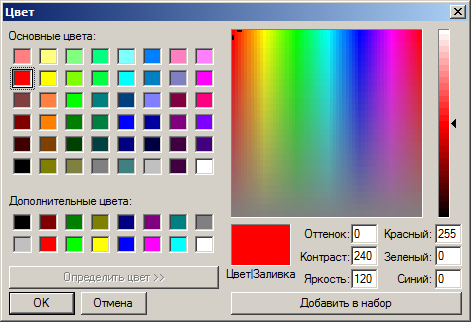
  • CE Lua ColorPicker (скрытый компонент)

    CE Plugins ce plugin ce lua ce components
    6
    1
    0 Голоса
    6 Сообщения
    231 Просмотры
    PitronicP
    значит не мой случай, мне женька только экзешники скинул, а как я понял нужны полностью исходники.
  • CE вывод списка записей и вывод свойств компонентов

    CE Plugins ce lua ce plugin ce components userdata
    2
    2
    0 Голоса
    2 Сообщения
    136 Просмотры
    MasterGHM
    Ищем свойства userData. UserData в Lua это пользовательский тип. Точно не знаю, но я думаю в документации в CE Lua (celua.txt или здесь на офф. сайте) тип userData у всех классов или большинства классов. Например, проверим, что главная форма CE это userData тип local mainFormCE = getMainForm() print(type(mainFormCE)) > userdata (вывод из консоли) Выводим список свойств следующим образом через getmetatable функцию. Метатаблица — это особая таблица свойств Lua-переменной local mainForm = getMainForm() local listUserData = createStringlist() for k,_ in pairs(getmetatable(mainForm)) do listUserData.add(k) end local allowCustomInput = false local id, name = showSelectionList("Title", "Caption", listUserData, allowCustomInput) print ('Index: '..id..", Name: "..name) listUserData.destroy() Результат в виде списка свойство переменной mainForm Чтобы наглядно было. Свойства эти похожи на свойства из Дельфи. Можно загуглить, они поддробно описываются. Берем например свойство цвет. Прочитаем оригинальное и запишем свое любое local mainFormCE = getMainForm() print(mainFormCE.getColor()) > 536870912 -- в hex-е это 0x20000000. Можно перевести в калькуляторе или через print(string.format("%08X", 536870912)) Случайное свое впишем ради наглядного примера mainFormCE.setColor(546484)
  • Рубрика "Lua код сегодня" №5 (активирующий скрипт)

    Прикреплена Перенесена Статьи и видео ce lua ce aa active rec ce memrec важно обучалка
    3
    3
    0 Голоса
    3 Сообщения
    167 Просмотры
    MasterGHM
    Update: Если скрипт не запускается, то вызывать reinitializeSymbolhandler(true) Пример здесь
  • CE Вывод иерархии компонентов

    CE Plugins ce plugin ce lua ce components
    1
    1
    0 Голоса
    1 Сообщения
    96 Просмотры
    MasterGHM
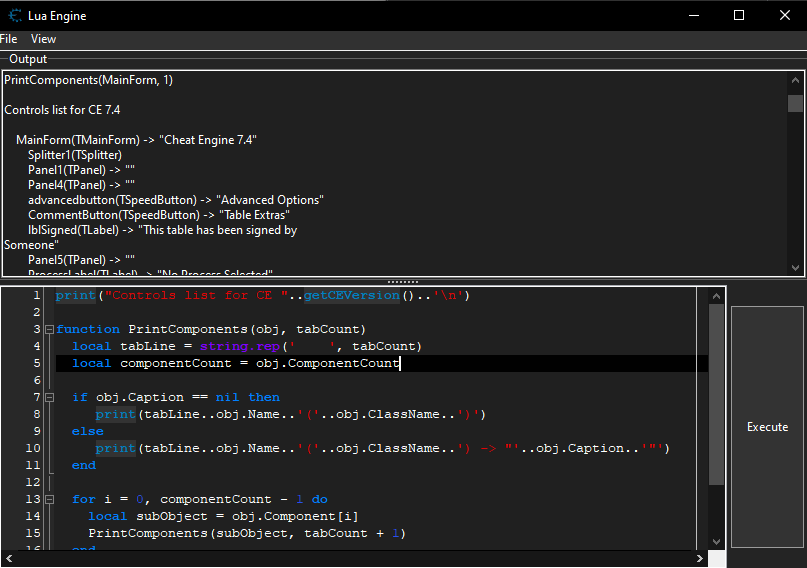
    Скрипт позволит вывести иерархию компонентов CE в виде текста. Иерархия компонентов CE нужна для написания плагинов. Например, для ColorPicker и для смены шрифта (подобротнее об этом было где-то было в блоге). print("Controls list for CE "..getCEVersion()..'\n') function PrintComponents(obj, tabCount) local tabLine = string.rep(' ', tabCount) local componentCount = obj.ComponentCount if obj.Caption == nil then print(tabLine..obj.Name..'('..obj.ClassName..')') else print(tabLine..obj.Name..'('..obj.ClassName..') -> "'..obj.Caption..'"') end for i = 0, componentCount - 1 do local subObject = obj.Component[i] PrintComponents(subObject, tabCount + 1) end end PrintComponents(MainForm, 1) Результат Controls list for CE 7.4 MainForm(TMainForm) -> "Cheat Engine 7.4" Splitter1(TSplitter) Panel1(TPanel) -> "" Panel4(TPanel) -> "" advancedbutton(TSpeedButton) -> "Advanced Options" CommentButton(TSpeedButton) -> "Table Extras" lblSigned(TLabel) -> "This table has been signed by Someone" Panel5(TPanel) -> "" ProcessLabel(TLabel) -> "No Process Selected" foundcountlabel(TLabel) -> "0" ScanText(TLabel) -> "Value:" lblScanType(TLabel) -> "Scan Type" lblValueType(TLabel) -> "Value Type" LoadButton(TSpeedButton) -> "" SaveButton(TSpeedButton) -> "" Label6(TLabel) -> "Found:" SpeedButton2(TSpeedButton) -> "" SpeedButton3(TSpeedButton) -> "" btnNewScan(TButton) -> "First Scan" gbScanOptions(TGroupBox) -> "Memory Scan Options" ScanOptionsModuleList(TComboBox) Panel2(TPanel) -> "" cbCopyOnWrite(TCheckBox) -> "CopyOnWrite" cbWritable(TCheckBox) -> "Writable" cbExecutable(TCheckBox) -> "Executable" Panel3(TPanel) -> "" Label2(TLabel) -> "Stop" Label1(TLabel) -> "Start" ToAddress(TEdit) FromAddress(TEdit) Panel6(TPanel) -> "" cbFastScan(TCheckBox) -> "Fast Scan" edtAlignment(TEdit) cbPauseWhileScanning(TCheckBox) -> "Pause the game while scanning" Panel8(TPanel) -> "" rbfsmLastDigts(TRadioButton) -> "Last Digits" rbFsmAligned(TRadioButton) -> "Alignment" btnNextScan(TButton) -> "Next Scan" ScanType(TComboBox) VarType(TComboBox) ProgressBar(TProgressBar) UndoScan(TButton) -> "Undo Scan" scanvalue(TEdit) Panel7(TPanel) -> "" sbOpenProcess(TSpeedButton) -> "" btnFirst(TButton) -> "First Scan2" btnNext(TButton) -> "Next scan 2" LogoPanel(TPanel) -> "" Logo(TImage) SettingsButton(TSpeedButton) -> "Settings" pnlScanValueOptions(TPanel) -> "" rbBit(TRadioButton) -> "Bits" rbDec(TRadioButton) -> "Decimal" cbHexadecimal(TCheckBox) -> "Hex" Panel9(TPanel) -> "" pnlScanOptions(TPanel) -> "" pnlFloat(TPanel) -> "" rt3(TRadioButton) -> "Truncated" rt1(TRadioButton) -> "Rounded (default)" rt2(TRadioButton) -> "Rounded (extreme)" cbUnicode(TCheckBox) -> "UTF-16" cbCaseSensitive(TCheckBox) -> "Case sensitive" cbFloatSimple(TCheckBox) -> "Simple values only" cbpercentage(TCheckBox) -> "Percent" cbNot(TCheckBox) -> "Not" cbCodePage(TCheckBox) -> "Codepage" cbRepeatUntilStopped(TCheckBox) -> "Repeat" cbLuaFormula(TCheckBox) -> "Lua formula" cbNewLuaState(TCheckBox) -> "Separate Lua state" Panel10(TPanel) -> "" cbUnrandomizer(TCheckBox) -> "Unrandomizer" cbSpeedhack(TCheckBox) -> "Enable Speedhack" Panel14(TPanel) -> "" Label54(TLabel) -> "Speed" lblSH0(TLabel) -> "0" lblSH20(TLabel) -> "500" btnSetSpeedhack2(TButton) -> "Apply" editSH2(TEdit) tbSpeed(TTrackBar) scanvalue2(TEdit) ScanText2(TLabel) -> "Scan Value" andlabel(TLabel) -> "and" Foundlist3(TListView) (TCustomListViewEditor) btnAddAddressManually(TButton) -> "Add Address Manually" btnMemoryView(TButton) -> "Memory View" cbCompareToSavedScan(TCheckBox) -> "Compare to first/saved scan" lblcompareToSavedScan(TLabel) -> "<xxxx>" UpdateTimer(TTimer) FreezeTimer(TTimer) PopupMenu2(TPopupMenu) (TMenuItem) -> "" (TMenuItem) -> "Add to new group" miAutoAssembleErrorMessage(TMenuItem) -> "<Error message here>" Deletethisrecord1(TMenuItem) -> "Delete this record" Change1(TMenuItem) -> "Change record" Description1(TMenuItem) -> "Description" Address1(TMenuItem) -> "Address" Type1(TMenuItem) -> "Type" Value1(TMenuItem) -> "Value" miUndoValue(TMenuItem) -> "Undo last edit" Smarteditaddresses1(TMenuItem) -> "Smart edit address(es)" Browsethismemoryregion1(TMenuItem) -> "Browse this memory region" miDisassemble(TMenuItem) -> "Disassemble this memory region" miShowAsSigned(TMenuItem) -> "Show as signed" Showashexadecimal1(TMenuItem) -> "Show as hexadecimal" miZeroTerminate(TMenuItem) -> "Zero-Terminate string" miShowAsBinary(TMenuItem) -> "Show as binary" miChangeColor(TMenuItem) -> "Change Color" SetHotkey1(TMenuItem) -> "Assign Hotkey" miSetDropdownOptions(TMenuItem) -> "Set/Change dropdown selection options" Freezealladdresses2(TMenuItem) -> "Toggle Selected Records" miFreezePositive(TMenuItem) -> "Freeze Positive" miFreezeNegative(TMenuItem) -> "Freeze Negative" Changescript1(TMenuItem) -> "Change script" miAsyncScript(TMenuItem) -> "Execute asynchronous" N5(TMenuItem) -> "-" miGeneratePointermap(TMenuItem) -> "Generate pointermap" Pointerscanforthisaddress1(TMenuItem) -> "Pointer scan for this address" Findoutwhataccessesthisaddress1(TMenuItem) -> "Find out what accesses this address" Setbreakpoint1(TMenuItem) -> "Find out what writes to this address" sep2(TMenuItem) -> "-" miDBVMFindWhatWritesOrAccesses(TMenuItem) -> "DBVM Find out what writes or accesses this address" sep1(TMenuItem) -> "-" Calculatenewvaluepart21(TMenuItem) -> "Recalculate new addresses" Forcerechecksymbols1(TMenuItem) -> "Force recheck symbols" N4(TMenuItem) -> "-" Cut1(TMenuItem) -> "Cut" Copy1(TMenuItem) -> "Copy" Paste1(TMenuItem) -> "Paste" MenuItem1(TMenuItem) -> "Select All" N1(TMenuItem) -> "-" CreateGroup(TMenuItem) -> "Create Header" miGroupconfig(TMenuItem) -> "Group config" miHideChildren(TMenuItem) -> "Hide children when deactivated" miBindActivation(TMenuItem) -> "Activating this entry activates it's children" miBindDeactivation(TMenuItem) -> "Deactivating this entry deactivates it's children" miRecursiveSetValue(TMenuItem) -> "Setting a value to this entry sets same value to children" miAllowCollapse(TMenuItem) -> "Allow left and right arrow keys to collapse and expand" miManualExpandCollapse(TMenuItem) -> "Manual expand/collapse" miAlwaysHideChildren(TMenuItem) -> "Always hide children" Plugins1(TMenuItem) -> "Plugins" foundlistpopup(TPopupMenu) (TMenuItem) -> "" miAddAddress(TMenuItem) -> "Add selected addresses to the addresslist" miChangeValue(TMenuItem) -> "Change value of selected addresses" miChangeValueBack(TMenuItem) -> "Change value of selected addresses back to previous/saved value" Browsethismemoryarrea1(TMenuItem) -> "Browse this memory region" Browsethismemoryregioninthedisassembler1(TMenuItem) -> "Disassemble this memory region" Removeselectedaddresses1(TMenuItem) -> "Remove selected addresses" Copyselectedaddresses1(TMenuItem) -> "Copy selected addresses" Selectallitems1(TMenuItem) -> "Select all items" MenuItem4(TMenuItem) -> "-" miShowPreviousValue(TMenuItem) -> "Show previous value column(s)" miOnlyShowCurrentCompareToColumn(TMenuItem) -> "Only show current "compare to" column" MenuItem13(TMenuItem) -> "-" miForgotScan(TMenuItem) -> "Reload the previous value list (Forgot value scan)" MenuItem14(TMenuItem) -> "-" miFlFindWhatAccesses(TMenuItem) -> "Find out what accesses this address" miFlFindWhatWrites(TMenuItem) -> "Find out what writes to this address" N2(TMenuItem) -> "-" miFoundListPreferences(TMenuItem) -> "Preferences" MenuItem19(TMenuItem) -> "-" miDisplayHex(TMenuItem) -> "Hexadecimal" miDisplayDefault(TMenuItem) -> "Default" miDisplayByte(TMenuItem) -> "Byte" miDisplay2Byte(TMenuItem) -> "2 Bytes" miDisplay4Byte(TMenuItem) -> "4 Bytes" miDisplay8Byte(TMenuItem) -> "8 Bytes" miDisplayFloat(TMenuItem) -> "Float" miDisplayDouble(TMenuItem) -> "Double" OpenDialog1(TOpenDialog) SaveDialog1(TSaveDialog) TopDisabler(TTimer) emptypopup(TPopupMenu) (TMenuItem) -> "" MenuItem2(TMenuItem) -> "New Item1" ccpmenu(TPopupMenu) (TMenuItem) -> "" Cut2(TMenuItem) -> "Cut" Copy2(TMenuItem) -> "Copy" Paste2(TMenuItem) -> "Paste" ActionList1(TActionList) actSave(TAction) -> "" actOpen(TAction) -> "" actAutoAssemble(TAction) -> "actAutoAssemble" actMemoryView(TAction) -> "actMemoryView" actOpenProcesslist(TAction) -> "" actOpenDissectStructure(TAction) -> "actOpenDissectStructure" actOpenLuaEngine(TAction) -> "actOpenLuaEngine" UpdateFoundlisttimer(TTimer) AutoAttachTimer(TTimer) MainMenu1(TMainMenu) (TMenuItem) -> "" (TMenuItem) -> "English" (TMenuItem) -> "Save scan session" (TMenuItem) -> "Load scan session" (TMenuItem) -> "-" File1(TMenuItem) -> "&File" miAddTab(TMenuItem) -> "Add scan tab" New1(TMenuItem) -> "Clear list" MenuItem8(TMenuItem) -> "Open Process" miOpenFile(TMenuItem) -> "Open File" miSaveFile(TMenuItem) -> "Save File" N7(TMenuItem) -> "-" miSave(TMenuItem) -> "Save" Save1(TMenuItem) -> "Save As..." Load1(TMenuItem) -> "Load" miLoadRecent(TMenuItem) -> "Load Recent" miSignTable(TMenuItem) -> "Sign table" MenuItem3(TMenuItem) -> "-" miSaveScanresults(TMenuItem) -> "Save current scanresults" miDeleteSavedScanResults(TMenuItem) -> "Delete scanresult" MenuItem6(TMenuItem) -> "-" MenuItem9(TMenuItem) -> "Generate generic trainer lua script from table" MenuItem5(TMenuItem) -> "-" MenuItem7(TMenuItem) -> "Quit" Edit3(TMenuItem) -> "&Edit" Settings1(TMenuItem) -> "Settings" Process1(TMenuItem) -> "&Process" OpenProcess1(TMenuItem) -> "Open Process window" CreateProcess1(TMenuItem) -> "Create Process" N6(TMenuItem) -> "-" a1(TMenuItem) -> "a" b1(TMenuItem) -> "b" c1(TMenuItem) -> "c" d1(TMenuItem) -> "d" e1(TMenuItem) -> "e" miTable(TMenuItem) -> "Table" miShowLuaScript(TMenuItem) -> "Show Cheat Table Lua Script" MenuItem10(TMenuItem) -> "-" miCreateLuaForm(TMenuItem) -> "Create form" miResyncFormsWithLua(TMenuItem) -> "Resynchronize forms with Lua" miLuaFormsSeperator(TMenuItem) -> "-" miAddFile(TMenuItem) -> "Add file" mi3d(TMenuItem) -> "D3D" miHookD3D(TMenuItem) -> "Hook Direct3D" MenuItem11(TMenuItem) -> "-" miSetCrosshair(TMenuItem) -> "Set custom crosshair" miWireframe(TMenuItem) -> "Toggle wireframe mode" miZbuffer(TMenuItem) -> "Toggle disabled zbuffer" miLockMouseInGame(TMenuItem) -> "Lock mouse in game window" miSetupSnapshotKeys(TMenuItem) -> "Start and configure snapshot recording" miSnapshothandler(TMenuItem) -> "Snapshot handler" ools1(TMenuItem) -> "&Tools" miDotNET(TMenuItem) -> ".Net" miGetDotNetObjectList(TMenuItem) -> "Get object list" miNetwork(TMenuItem) -> "Network" miCompression(TMenuItem) -> "Compression" miScanDirtyOnly(TMenuItem) -> "Scan changed regions only" miScanPagedOnly(TMenuItem) -> "Scan paged (physical) memory only" Plugins2(TMenuItem) -> "P&lugins" miLanguages(TMenuItem) -> "Languages" miHelp(TMenuItem) -> "&Help" Helpindex1(TMenuItem) -> "Cheat Engine Help" miLuaDocumentation(TMenuItem) -> "Lua documentation" miTutorial(TMenuItem) -> "Cheat Engine Tutorial" MenuItem12(TMenuItem) -> "Cheat Engine Tutorial (64-Bit)" MenuItem15(TMenuItem) -> "Cheat Engine Tutorial Games" miEnableLCLDebug(TMenuItem) -> "Generate errorlogs" N8(TMenuItem) -> "-" miAbout(TMenuItem) -> "About" pmTablist(TPopupMenu) (TMenuItem) -> "" miRenameTab(TMenuItem) -> "Rename" miTablistSeperator(TMenuItem) -> "-" miCloseTab(TMenuItem) -> "Close tab" pmValueType(TPopupMenu) (TMenuItem) -> "" miDefineNewCustomType(TMenuItem) -> "Define new custom type (Auto Assembler)" miDefineNewCustomTypeLua(TMenuItem) -> "Define new custom type (LUA)" miEditCustomType(TMenuItem) -> "Edit selected custom type" miDeleteCustomType(TMenuItem) -> "Delete selected custom type" miShowCustomTypeDebug(TMenuItem) -> "Show custom type debug info" ColorDialog1(TColorDialog) pmResetRange(TPopupMenu) (TMenuItem) -> "" miResetRange(TMenuItem) -> "Reset range" pmScanRegion(TPopupMenu) (TMenuItem) -> "" miPresetAll(TMenuItem) -> "Preset: Scan all memory" miPresetWritable(TMenuItem) -> "Preset: Scan writable memory" MainMenu2(TMainMenu) (TMenuItem) -> "" tLuaGCPassive(TTimer) tLuaGCActive(TTimer) mfImageList(TImageList) frmAutoInject(TfrmAutoInject) -> "Lua script: Cheat Table" Panel1(TPanel) -> "" Panel3(TPanel) -> "" btnExecute(TButton) -> "Execute script" Panel2(TPanel) -> "" MainMenu1(TMainMenu) (TMenuItem) -> "" File1(TMenuItem) -> "File" miNewWindow(TMenuItem) -> "New Window" miNewTab(TMenuItem) -> "New Tab" Load1(TMenuItem) -> "Open" Save1(TMenuItem) -> "Save" SaveAs1(TMenuItem) -> "Save As..." miLuaSyntaxCheck(TMenuItem) -> "Syntax Check" Assigntocurrentcheattable1(TMenuItem) -> "Assign to current cheat table" N2(TMenuItem) -> "-" Exit1(TMenuItem) -> "Exit" View1(TMenuItem) -> "View" Syntaxhighlighting1(TMenuItem) -> "Syntax highlighting" MenuItem3(TMenuItem) -> "Auto assembler syntax highlighting preferences" MenuItem2(TMenuItem) -> "Lua syntax highlighting preferences" MenuItem1(TMenuItem) -> "C highlighting preferences" AAPref1(TMenuItem) -> "Preferences" emplate1(TMenuItem) -> "Template" Codeinjection1(TMenuItem) -> "Code injection" APIHook1(TMenuItem) -> "API Hook" Coderelocation1(TMenuItem) -> "Code relocation" miCallLua(TMenuItem) -> "Call CE lua function" menuAOBInjection(TMenuItem) -> "AOB Injection" menuFullInjection(TMenuItem) -> "Full Injection" CheatTablecompliantcodee1(TMenuItem) -> "Cheat Table framework code" Inject1(TMenuItem) -> "Inject" Injectincurrentprocess1(TMenuItem) -> "Inject into current process" Injectintocurrentprocessandexecute1(TMenuItem) -> "Inject into current process and execute" OpenDialog1(TOpenDialog) SaveDialog1(TSaveDialog) PopupMenu1(TPopupMenu) (TMenuItem) -> "" miCut(TMenuItem) -> "Cu&t" miCopy(TMenuItem) -> "&Copy" miPaste(TMenuItem) -> "&Paste" miUndo(TMenuItem) -> "&Undo" miRedo(TMenuItem) -> "Redo" N6(TMenuItem) -> "-" miFind(TMenuItem) -> "&Find..." mifindNext(TMenuItem) -> "Find Next" mifindPrevious(TMenuItem) -> "Find Previous" miReplace(TMenuItem) -> "Replace" TabMenu(TPopupMenu) (TMenuItem) -> "" miMoveLeft(TMenuItem) -> "Move left" miMoveRight(TMenuItem) -> "Move right" miRenameTab(TMenuItem) -> "Rename" Close1(TMenuItem) -> "Close" FindDialog1(TFindDialog) undotimer(TTimer) ReplaceDialog1(TReplaceDialog) aaImageList(TImageList) (TSynAASyn) (TSynCppSyn) (TSynLuaSyn) Assemblescreen(TSynEditPlus) (TSynBeautifier) SynLeftGutterPartList1(TSynGutterPartList) SynGutterMarks1(TSynGutterMarks) SynGutterLineNumber1(TSynGutterLineNumber) SynGutterChanges1(TSynGutterChanges) SynGutterSeparator1(TSynGutterSeparator) SynGutterCodeFolding1(TSynGutterCodeFolding) SynRightGutterPartList1(TSynRightGutterPartList) (TTimer) (TAddresslist) -> "" List(TTreeviewWithScroll) (TTimer) (TTimer) Header(THeaderControl) (TPopupMenu) (TMenuItem) -> "" (TMenuItem) -> "Sort on click" (TTimer)